Standard Photo Editors vs Kyupeen-Style Effect Apps


Standard Photo Editors vs Kyupeen-Style Effect Apps
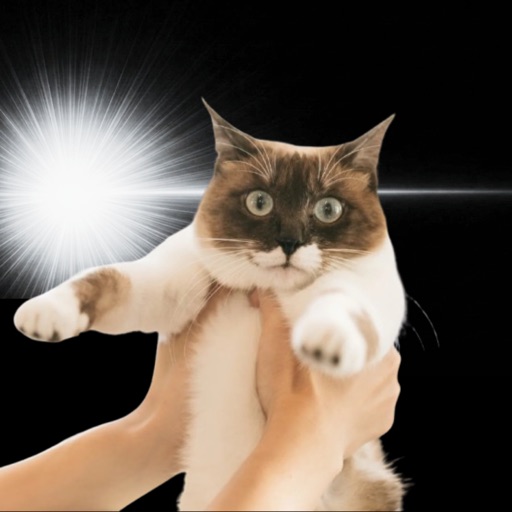
Standard photo editors fix exposure, colour and crop. Effect apps in the kyupeen style add sparkle, light beams, manga-style halos and other visible flourishes. They look like the same category from far away, but the goal is different — refine versus dramatize.
This article compares them by purpose, time-per-photo, SNS impact and operation count, so you can pick by use-case rather than feature list.
Comparison table
| Axis | Standard editor | Kyupeen-style effect app |
|---|---|---|
| Goal | Refine | Dramatize |
| Time per photo | 1–5 minutes | 5–30 seconds |
| Main interaction | Sliders and layers | Tap a preset |
| Recoverable from over-edit? | Slow to undo | One-tap switch |
| SNS impact | Clean but quiet | Eye-catching, polarising |
| Pet photo fit | Hard to save soft-focus shots | Embraces softness as style |
| Free tier | Wide | Narrower (popular effects often paid) |
| Learning curve | Steeper | Almost zero |
Strengths and weaknesses
Standard editors give precision. Two photos taken in different light can be matched. The cost is time and a vocabulary (curves, masks, tone, white balance) that puts off casual users.
Effect apps give immediacy. A tap turns a meh photo into a thing. The cost is taste — the same effect twice in a row looks tacky, and pet owners who post daily quickly learn to pace themselves.
Who fits which
If you spend serious time per photo and want consistent output (think a small business or a curated travel feed), a standard editor is the right base.
If you post daily, multiple photos, often of pets or food, and the bottleneck is throughput rather than precision, an effect app is a better daily driver.
Many people benefit from owning both — a standard editor to fix the colour, an effect app to add the moment.
Use-case routing
Decide once which kind of photo goes through which app:
- Indoor calm shots, work content → standard editor.
- Pets, food, sky, walks → effect app.
Do not pick by mood — that is how you end up with neither finished. Pick by subject and the routine sticks.
Where キュピーン fits
キュピーン is a kyupeen-style effect app focused on adding manga-style light, sparkle and dramatic beams to pet and everyday photos in one tap. It pairs well with a standard editor: edit exposure first, then add the moment.
How to honestly compare
Look back at your last 30 SNS posts. Count how many are 'refine' edits versus 'dramatize' edits. The bigger pile shows which app fills the missing tool.
FAQ
Cannot a standard editor do the same? Yes, with five minutes per photo. The difference is throughput.
Does the result look gaudy? Effect strength is adjustable. Dial back sparkle and beam power for a calmer finish.
Best for pet photos? Effect apps usually win — they tolerate soft focus.
Free tier coverage? Standard editors have generous free tiers; effect apps usually charge for popular presets.
Pick one only? Decide by what you post most, not by which sounds more serious.
Summary
Refine versus dramatize is a real choice, not a marketing one. Use the right tool for the right photo and your feed gains rhythm without extra time.
Related articles
Kyupeen
Kyupeen is a pet photo editing app that adds sparkling light effects to cat, dog, and everyday photos. Make a cute or funny image quickly.