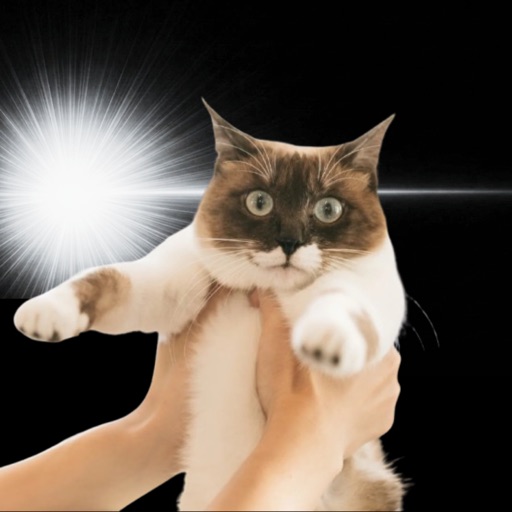
Kyupeen — Complete Guide
Pets, plushies, fandom merch, even regular selfies. Here is how to turn one boring photo into a manga-panel reveal moment in two taps.


What is this app?
Kyupeen is a photo app that overlays manga-style 'aha!' / 'realized!' / 'idea!' sparkle effects with AI. It works on pets, plushies, people, objects, and fandom items.
Common situations to use it
- Make pet photos go viral
Add 'no way!' or 'idea!' to your cat's expression and you have a share-worthy family-chat post.
- Plushie and figure photography
Plushie shots and figure photos suddenly read like a manga panel — they get more engagement on socials.
- Fandom merch posts
Acrylic stands, badges, plushies. Add an 'aha!' beat and the post turns into fan-relatable storytelling.
- Everyday snaps with a punchline
Food photos, selfies, sky shots — adding a reveal effect turns a snapshot into a tiny story.
- Birthday and message images
Use it as a single page in a friend slideshow or birthday message graphic.
How to use (3 steps)
- 1 Pick a photo
Choose a photo where the subject is clearly visible.
- 2 Pick an effect type
Choose 'no way', 'realized', or 'idea' depending on the photo's mood.
- 3 Save and share
Save the result and post it directly to Instagram, X, or TikTok.
Good for people who
- People who post pet photos for laughs
- Plushie / figure photographers
- Fans who post merch and unboxings
- People who find pro photo editors too heavy
- Anyone who wants one extra punchy image for a feed
Not for people who
- Heavy retouching workflows (skin / color grading)
- Strict commercial-use clean asset pipelines
- People who do not enjoy editing photos at all
Frequently asked questions
- Is it free?
- Core features are free. The app shows ads. There is no paid plan right now.
- Is it available on iPhone and Android?
- Yes. It is available on both the App Store and Google Play.
- Does it work on subjects other than pets?
- Plushies, figures, people, food, objects, fandom items — anything visible in frame works.
- Are my photos sent to a server?
- Photos go through AI processing as needed for the effect, but they are not stored long-term tied to your identity. See the in-app privacy notice for details.
- How accurate is face detection?
- Clear, front-lit photos work best. Backlit or far-away photos may not place effects well — try another photo.
- Can I post results directly?
- Yes. Saved images post normally to Instagram, X, TikTok, etc.
A note from the developer
I started this thinking 'my cat would be hilarious with a manga sparkle on her face' and that is still the design north star — two taps, no fiddly menus.
Kyupeen